Shoppable videos help turn product views into sales, but keeping them updated with product inventory can be difficult. When customers click on out-of-stock WooCommerce products, they may find items they can no longer buy, leading to a poor shopping experience and lost sales.
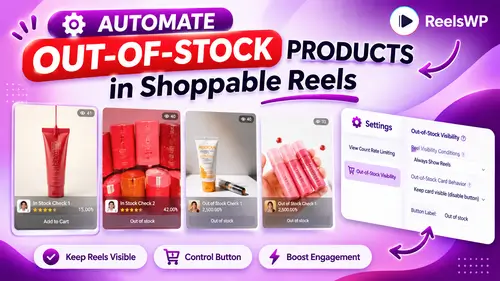
With Out-of-Stock Visibility Controls in ReelsWP Pro, you can easily manage how your shoppable videos show unavailable products. You can hide reels that feature out-of-stock products, disable their buy buttons and show a custom “Sold Out” label, or display only in-stock products. This keeps your video feeds up to date with your WooCommerce inventory and helps customers find products they can buy.
Follow the steps below to set up out-of-stock visibility controls for your WooCommerce shoppable videos.
1. Install and Activate ReelsWP
- You need the ReelsWP and ReelsWP Pro plugin installed and activated on your website.
- You can find detailed installation instructions in our dedicated installation blog post.
- Install the plugin and click Activate once the installation is complete.
2. Open ReelsWP in your WordPress dashboard
- Log in to WordPress admin.
- From the left menu, click ReelsWP.
- In the sidebar, navigate to Settings.
- Select the Out-of-Stock Visibility tab from the settings menu.
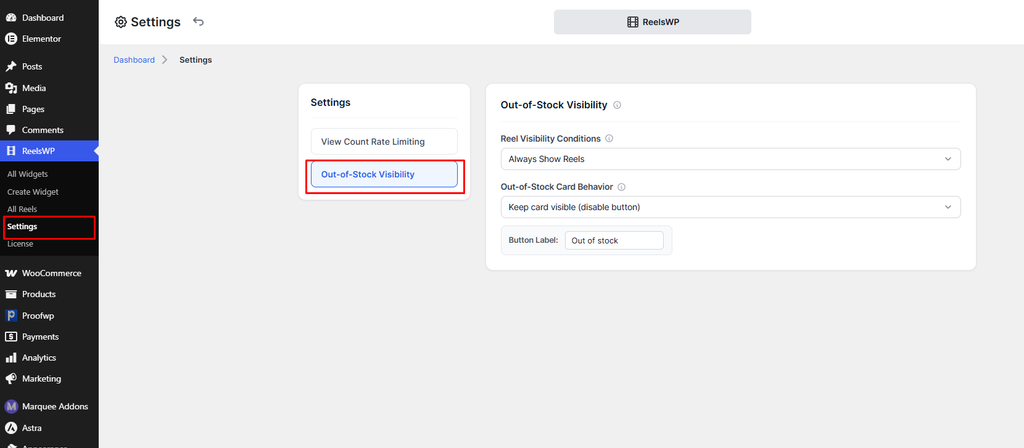
Configure Out-of-Stock-Visibility
Under Out-of-Stock Visibility, you can configure the following settings:
1. Reel Visibility Conditions
Choose when a reel should be hidden based on the stock status of its linked products:
- Always Show Reels: Keep reels visible regardless of product availability.
- Hide Reel If All Products Are Out Of Stock: Hide a reel only when every product linked to it is out of stock.
- Hide Reel If Any Product Is Out Of Stock: Hide a reel when at least one linked product goes out of stock.
2. Out-of-Stock Card Behavior
Choose what happens to product cards when their linked products are unavailable:
- Keep Card Visible (Disable Button): Keep the product card visible but disable its buy button.
- Show In-Stock Products Only: Display only products that are currently in stock.
- Hide All Product Cards In Reel: Hide all product cards with the reel.
3. Custom Button Label
When using the “Keep Card Visible (Disable Button)” option, you can customize the disabled button text. For example, use “Out of stock” to let customers know why the product cannot be purchased.
4. WooCommerce Backorder Support
If you allow backorders for WooCommerce products, ReelsWP Pro treats them as in stock. Customers can still buy these products directly from your shoppable videos without having their buy buttons disabled or reels hidden.
FAQs
1. How can I show out-of-stock products without allowing customers to buy them?
Select Always Show Reels under Reel Visibility Conditions and Keep Card Visible (Disable Button) under Out-of-Stock Card Behavior. The reel and product card will stay visible, but customers won’t be able to click the buy button.
2. How can I show only available products inside my reels?
Select Always Show Reels under Reel Visibility Conditions and Show In-Stock Products Only under Out-of-Stock Card Behavior. Your reels will stay visible, but product cards for out-of-stock items will be hidden.
3. How can I hide a reel when its linked products are out of stock?
You can choose between two settings:
- Hide Reel If All Products Are Out Of Stock: Hides the reel when all linked products are out of stock.
- Hide Reel If Any Product Is Out Of Stock: Hides the reel when at least one linked product is out of stock.
4. How do WooCommerce backorders work with ReelsWP?
When backorders are enabled for a WooCommerce product, ReelsWP treats it as available. Customers can still purchase backordered products directly from your reels.
6. How can I change the button text for out-of-stock products?
Select Keep Card Visible (Disable Button) under Out-of-Stock Card Behavior, then enter your preferred text in the Button Label field, such as “Sold Out”. The custom text will appear on the disabled buy button.