
Special Launch Deal Is Live!

Add Shoppable Video tags to your WordPress site and boost conversions by 3x

Get Flat 26% OFF ! Try Coupon

launch26

Days
Hours
Minutes
Seconds
Search

How To Install ReelsWP in WordPress

Follow below instructions to install ReelsWP:

  • Go to WordPress Dashboard: Click on PluginsAdd New.
  • Search for ReelsWP: In the search bar, type ReelsWP.
  • Install Plugin: When the plugin appears (by Debugger Studio), click Install Now.
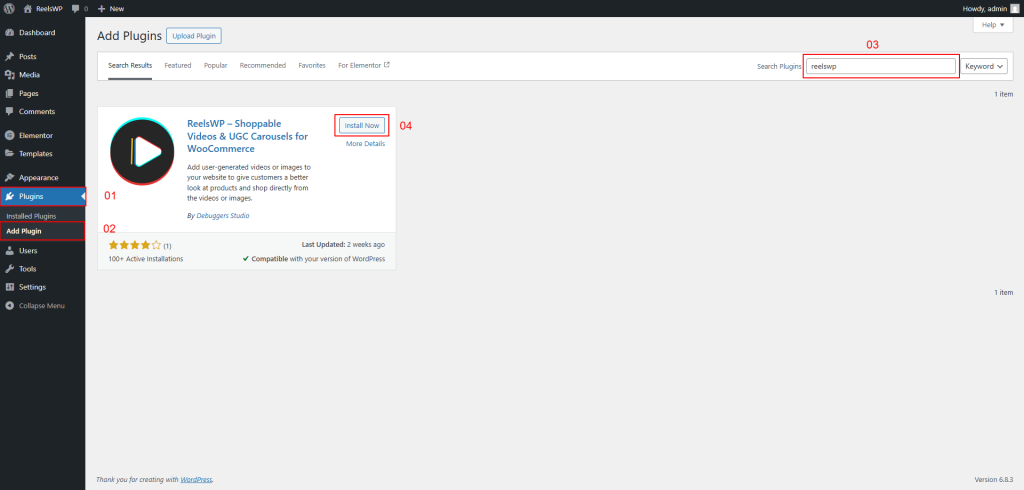
Installation ReelsWP: 1.0

Wait for the installation to finish, then click Activate. The plugin will now be ready to use on your website.

Activate ReelsWP: 1.1
On this page
Share this article
Recent Post
Join 100+ Happy Customers

Subscribe For The Latest Updates

No charge. Unsubscribe anytime.

Special Launch Deal Is Live!

Add Shoppable Video tags to your WordPress site and boost conversions by 3x

Grab It at Flat 26% OFF ! Try coupon

Launch26

Days
Hours
Minutes
Seconds
Scroll to Top